FOR TEACHERS
Every student makes a real song. You stay in control of the room.
No logins, no installs, no budget. Put one word on the board and your whole class is making music in about a minute, on the Chromebooks, iPads and phones they already have. You see who's stuck, hear any student from your own phone, and collect every song before the bell.
Free, no ads, no sign-up. Nothing for students to install, and no accounts to make.
- NO STUDENT ACCOUNTS
- NO CHAT
- UP TO 60 STUDENTS
- ANY DEVICE
- FREE
SOUND FAMILIAR?
Half the period goes to logins and passwords.
One word, no accounts. Put a word like PIXEL42 or a QR code on the board. Students scan or type it and they're in, each as their own critter, with nothing to install and nothing to remember.
Thirty devices, all at full volume.
HUSH EVERYONE. One tap stops every student's music behind EYES UP HERE, and the button counts the phones as they go quiet. QUIETER PHONES halves every student speaker for the whole class.
I can't tell who's stuck until the bell rings.
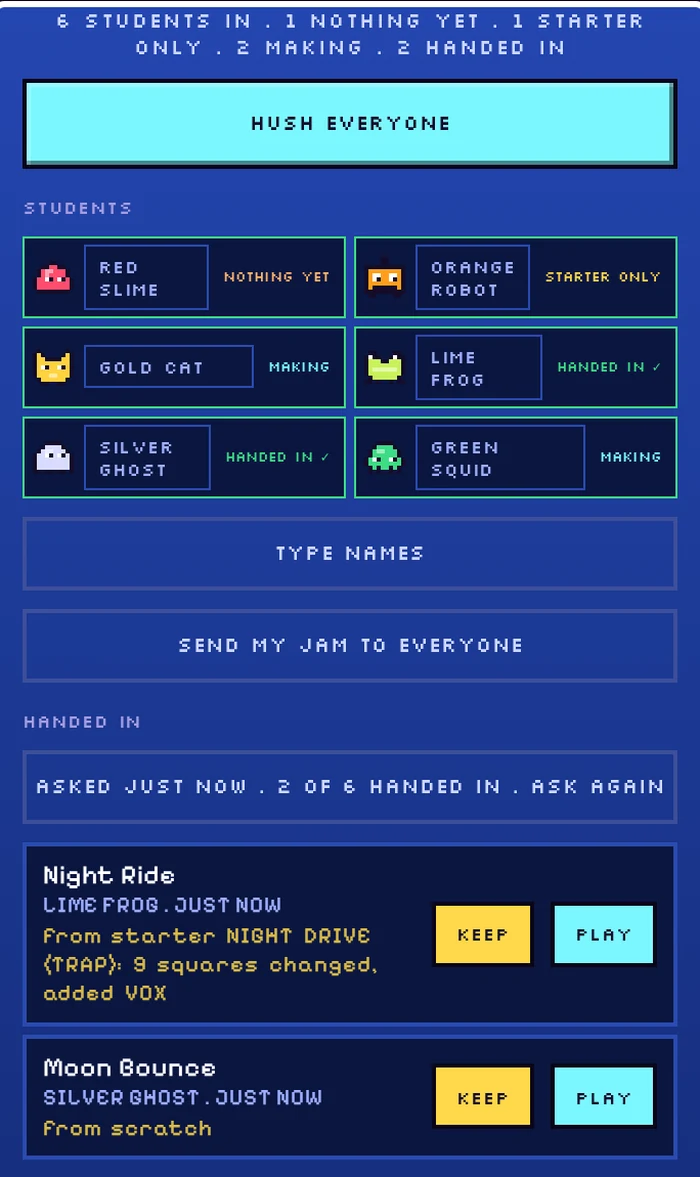
A live status on every critter: NOTHING YET, STARTER ONLY, MAKING, HANDED IN. Tap any one to hear what that student is making right now, from across the room.
Did they make it, or just press play on a template?
Every hand-in says what the student did: made from scratch, or which starter beat it began as, how many squares changed and which instruments and sounds are new.
Collecting everyone's work is chaos.
HAND IN NOW asks every student who hasn't handed in, and counts the songs as they arrive. KEEP ALL AND END saves them all to your device, with a class file ready to grade.
Some of my kids say they're not musical.
Sound in one tap. Starter beats in 6 genres give anyone a groove to change, and the scale lock means every note fits. The shy ones get going too.
Privacy forms and worried parents.
Anonymous by design. No student accounts, names, emails or chat. Songs go only to you, the public Wall is off for them, and the class is deleted from plip's server when it ends.
No budget, and a cart of mixed devices.
Free and in the browser. No ads, no licences, nothing to install. Chromebooks, iPads, laptops and phones all work, side by side.
HOW A CLASS GOES
TO EVERY PHONE
- GIVE EVERYONE A STARTING BEAT
- HUSH EVERYONE
- HAND IN NOW
- PINK CATMAKING
- MINT FROGHANDED IN
- SKY SLIMESTARTER ONLY
- ROSE GHOSTNOTHING YET
Each student: their own phone, their own song. No accounts, no names, no Wall.
BACK TO YOU
- A STATUS ON EVERY CRITTER
- LISTEN IN, LIVE
- HAND-INS: WHAT EACH ONE MADE
- Start the class. Tap START A CLASS (here, or from the ? help inside plip). Choose whether starter beats are on, whether student phones play at half volume, and whether students see when you listen. You get a word, a QR code and a link for the board.
- Students join in a minute. They scan, tap the link, or type the word (under PRESS START: in a class? type the word). Each starts on a fresh jam as a critter no classmate shares, shown in the corner of their own screen so you can match faces to phones.
- Teach. Give everyone the same starting beat: one of your own songs, or any starter beat by name (listen or change it first if you like). Or let them pick a starter beat themselves, or start from silence. HUSH EVERYONE whenever you need eyes up.
- Coach. Watch the statuses, tap a critter to listen in, and NEXT to go around the room. Play a student's song for the class with one tap.
- Collect. HAND IN NOW, then KEEP ALL AND END. Every student and every song, in one file.
WHAT YOU WALK AWAY WITH
The class file
One page you can print, keep in Google Drive or email to yourself: every student who joined (even those who made nothing), their song, what it was made from, when, an OPEN IN PLIP link and an empty notes and grade column.
Names that stay with you
TYPE NAMES puts a box beside every critter. Names live only on your device and in your class file, are never sent anywhere, and never show on the bar a projector sees.
Songs worth sharing
Kept songs live in FILE, CLASS SONGS on your device, ready to play back for the class. For a music tech lesson, any song goes to GarageBand or another DAW as stems and MIDI.
SAFE BY DESIGN
- No accounts, no names, no emails. Students are anonymous critters.
- No chat anywhere in plip.
- Songs go only to you. The public Wall is off for students in a class, the server refuses their Wall posts, and it stays closed on their device after class until plip is opened again.
- Personal details are refused. A song name with a real name and an age, a school or a phone number is turned down, and the student is told why.
- Nothing lingers. Classes end after 12 hours at most, and hand-ins are deleted when the class ends. What you keep lives on your device.
LESSON IDEAS
Rhythm
Build four on the floor on KICK, then a backbeat on SNARE. Change one square and hear the groove change.
Scales and melody
Turn on the scale lock (major, minor, blues, pentatonic and more) and improvise without wrong notes. Record a 2 bar phrase.
Reading the notes
Open ROLL on a melody: every note sits on a named row with its real length, and chords show their names. Move a note and hear what changed.
Math: fractions you can hear
Sixteen squares make a bar. Fill every fourth for quarter notes, every second for eighths, and hear how the fractions add up.
Science: how sound works
In the Sound Lab, draw a wave and drag the envelope: hear attack, decay, sustain and release change a sound.
English: score a story
Students read a poem or a scene, then make the music for it and hand it in with a title that tells the mood.
QUESTIONS
How long does it take to set up?
How many students can join?
What devices does it need?
Does it cost anything?
Do I need to be a musician?
What if students wander off task?
How do I grade the songs?
Can students work together?
More detail in the classroom answers of the FAQ.
MORE ABOUT PLIP
Your next class could be making music in a minute.
START A CLASSOr open plip and try it yourself first.